
Plans
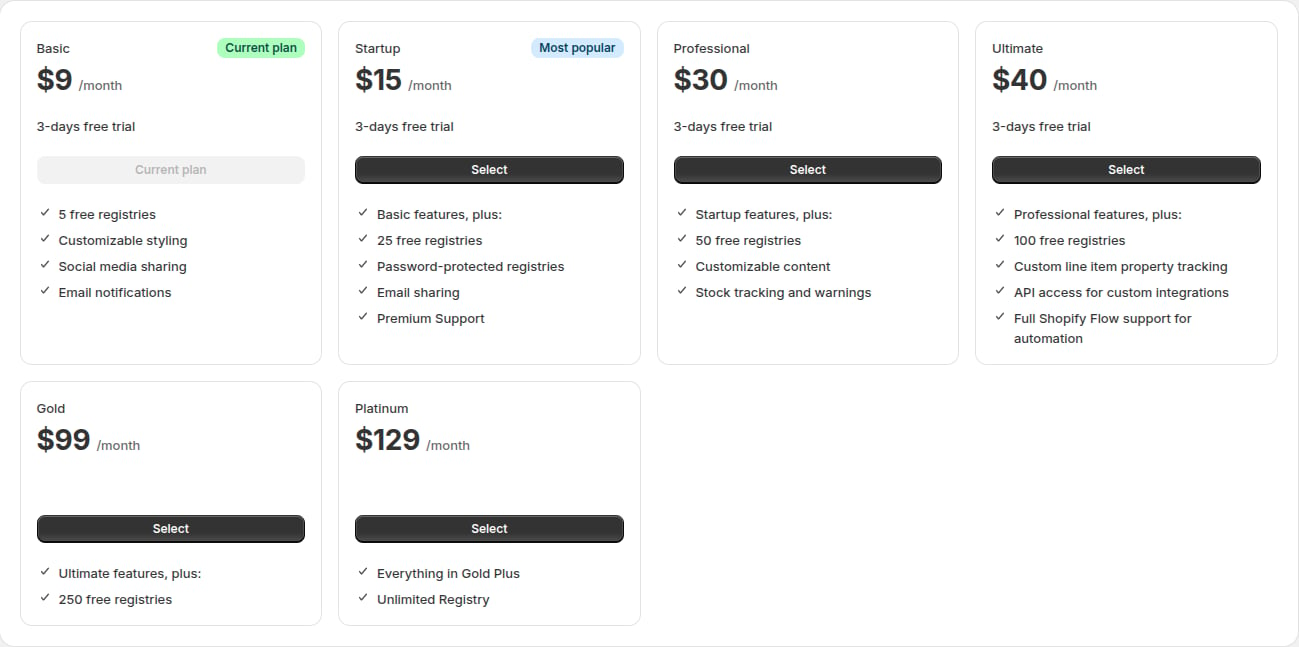
Basic, Startup, Professional and Ultimate include a 3-day free trial. Each plan includes everything in the plans before it.The Billing page in the app always shows the current prices and limits. If they differ from this page, the app is correct.
What each plan adds
Basic
Basic
- Gift registries with Add to Registry buttons
- Sharing and registry search
- Email notifications
Startup
Startup
Everything in Basic, plus:
- Password-protected registries
- Custom event types
- Gift messages from guests
- Sharing by email
- Weekly purchase summaries
Professional
Professional
Everything in Startup, plus:
- Customizable hero banner
- Stock tracking
- Your logo and brand colours in emails
- Event reminder and event closure emails
- Order tracking and full purchase history
- Email template editor
Ultimate
Ultimate
Everything in Professional, plus:
Gold and Platinum
Gold and Platinum
Everything in Ultimate, with higher limits for large catalogs and stores running many registries. See the table above.
Choose or change your plan
1
Open Billing
In the app, click Billing.
2
Select a plan
Click Select on the plan you want. Shopify’s plan page opens.
3
Approve the charge
Approve the plan on Shopify’s page. You’re returned to the app.
Without an active plan
- The app opens on the plans page until you choose a plan.
- Your storefront becomes read-only. Existing registries stay visible and guests can still buy gifts. Owners can’t create, edit or delete registries or change items. They see: “This store’s gift registry is read-only. The store owner needs to choose a plan to make changes.”